Transform DevTool Alerts Into Automated Engineering Workflows with Continue
Your development workflow already generates signals. A Sentry alert fires. A Slack message mentions a bug. A GitHub issue gets created. PostHog surfaces a drop in user behavior.
But signals without action slow teams down.
Continue’s Integrations change that by turning tools you already use into automated, AI-powered workflows with cloud agents that take action the moment something happens. Today we’re launching the next major piece of Continuous AI: Integrations.
Cloud agents are AI agents that run continuously in the cloud, connected directly to your development and production systems. Unlike local or IDE-only AI agents, our cloud agents respond to real events, alerts, pull requests, deployments and take action automatically or can be enabled manually.
The Real Problem: Alerts Aren’t the Work. Everything After Them Is
Every engineering team knows the pain:
- A Slack message mentions a bug
- Sentry fires an error
- A GitHub issue opens
- PostHog shows a drop in user behavior
These signals demand attention, but none of them are the actual work. Developers still have to:
- Investigate the root cause
- Analyze stack traces
- Open or refine issues
- Write a fix
- Update documentation
- Communicate status
- Plan follow-up steps
Every alert becomes a manual workflow that steals engineering time. Continue automates that entire first pass with our cloud agents.
What Happens When You Connect Your Dev Tools to Cloud Agents?
By connecting your tools in Mission Control, you give your Continue cloud agents the context they need to:
- Investigate issues
- Propose fixes
- Generate diffs and PRs
- Update docs
- Create or refine tasks
- Summarize incidents
- Communicate progress in Slack
Whether the signal comes from Sentry, GitHub, Slack, Snyk, or PostHog, Continue can convert it into an actionable engineering workflow.
What Cloud Agents You Can Connect Today
These integrations let your existing developer tools become triggers for automated AI workflows with no changes to your stack, no new dashboards, no new process overhead.
GitHub — Automated Repo Health & CI
Agents can create PRs, open issues, investigate merged changes, generate reports, and maintain your repo automatically.
Sentry — Error Triage & Fixing
Surface runtime errors, analyze stack traces, generate root-cause summaries, and propose fixes.
Snyk - Automatic Security and Vulnerability Remediation
Automatically triage vulnerabilities, produce remediation PRs, and run scheduled security reviews. (Learn more about our Snyk partnership!)
PostHog - Detect Changes in PRs and Create or Update Related Dashboards.
Let agents analyze product analytics, spot patterns, and generate PRs or follow-up tasks.
Slack - Conversational Workflow to Code Actions
Bring conversational workflows to where your team already collaborates. Mention @Continue and turn discussions into issues or PRs.
Sanity, Supabase, Atlassian, Netlify - Secure Database policies, Automatic Performance Feedback, and Update Your Tickets
Database updates, schema docs, Jira tickets, site audits—your operations layer becomes programmable through AI.
How Our Cloud Agents Work
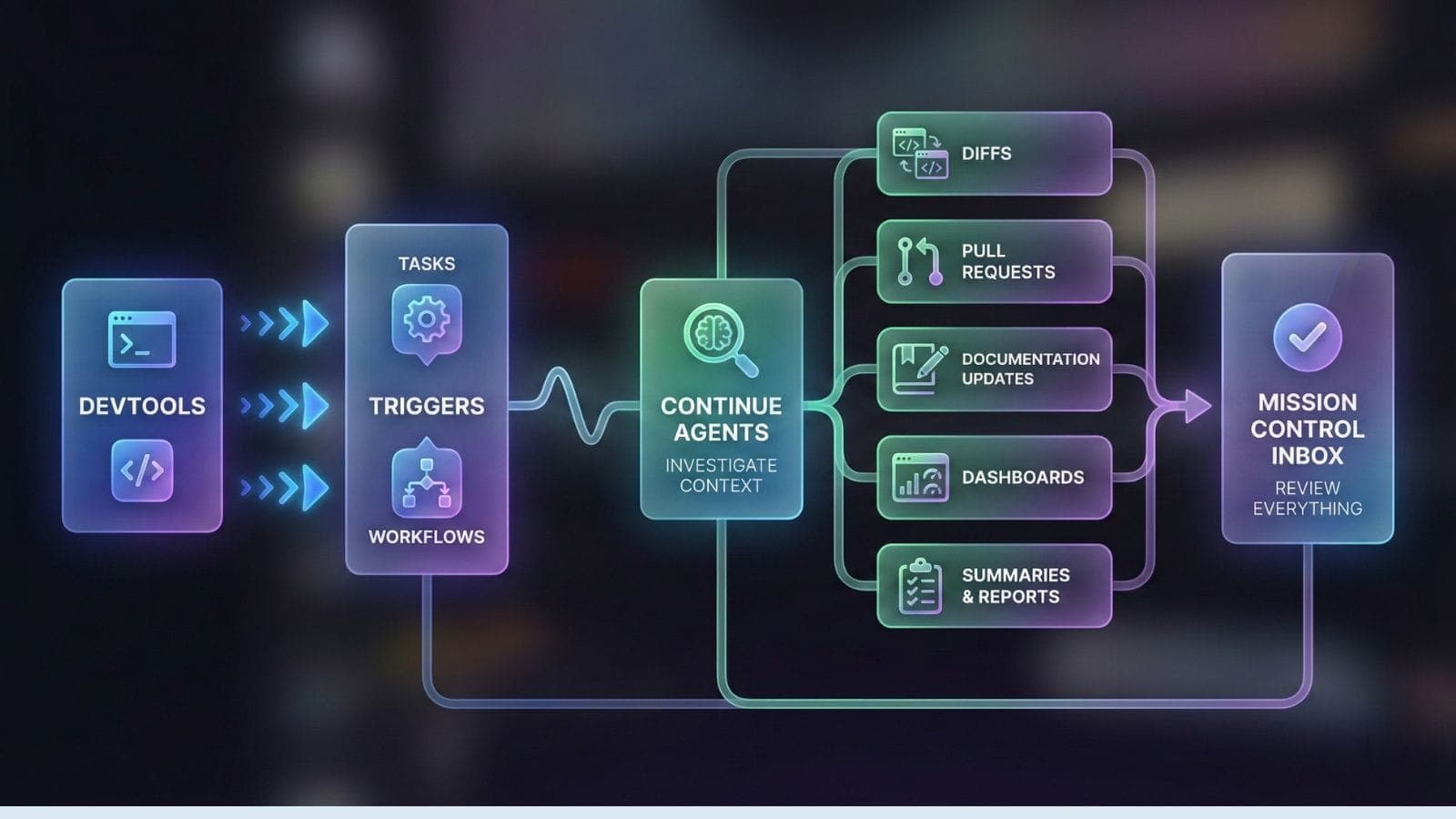
Once an integration is connected:
- Your DevTools send signals
- Those signals can trigger Tasks or Workflows
- Continue cloud agents investigate the context
- Agents generate:
- Diffs
- Pull requests
- Documentation updates
- Dashboards
- Summaries & reports
- You review everything in the Mission Control Inbox
Why Connecting Your DevTools to Cloud Agents Matters
Sifting through dashboards, chasing errors, triaging issues, checking schema updates, maintaining PR hygiene—it’s endless.
DevTool Integrations flip the model.
Instead of alerts demanding your attention, Continue cloud agents do the first pass for you:
- Is this real?
- What caused it?
- What code is affected?
- Can we propose a fix?
- Should we open a ticket?
- What should we test?
Engineers step in only where judgment, creativity, or product understanding is required.
Get Started with Cloud Agents
Today’s integrations are just the start.
Our goal is simple: If your tools can emit it, Continue should be able to act on it.
Errors → fixes. Vulnerabilities → PRs. Signals → artifacts. Discussions → actions.
Continuous AI for real engineering teams.
Setting up integrations takes minutes. Connect your GitHub repositories to give cloud agents access to your code. Link Sentry to start automating error responses. Add Slack to enable conversational workflows. Each integration you connect multiplies what your agents can do. You can try out these integrations today.
- Sentry — Surface runtime errors, analyze stack traces, generate root-cause summaries, and propose fixes.
- Snyk — Automatically triage vulnerabilities, produce remediation PRs, and run scheduled security reviews.
- PostHog — Let agents analyze product analytics, spot patterns, and generate PRs or follow-up tasks.
- Slack — Bring conversational workflows to where your team already collaborates. Mention @Continue and turn discussions into issues or PRs.
- Sanity — Keep schema docs, content, and backend changes synchronized and automated through AI-driven updates.
- Supabase — Automate database updates, schema diffs, security reviews, and generate helpful PRs for backend changes.
- Atlassian — Keep Jira issues updated, automate workflows, and let agents generate tasks, summaries, and updates.
- Netlify — Automate deploy previews, site audits, and performance reports—your web ops layer becomes programmable.
Visit Mission Control to start connecting the tools you already use.