Introducing Mission Control: Your Upgraded Developer AI Dashboard
Recently, we shipped a completely redesigned Mission Control, your new home base for building, running, and scaling Continuous AI inside your development workflow.

If you’ve used Continue before, you know the power of AI that actually understands your codebase. But we wanted to make something bigger, an easier way for teams to operationalize AI and make it fit into how your teams work.
The new Mission Control is our answer.
What’s New
We rebuilt Mission Control from the ground up with the goal of making Continuous AI easier to set up, faster to use, and ready for teams.
The UI now matches how developers actually work:
- Sessions, Tasks, and Agents are organized so you can move from triage → investigate → fix in seconds.
- GitHub-linked Sessions make it natural to trace an issue from signal → diff → PR.
- Your existing components (Agents, Models, MCP Servers, Prompts) are all still available at hub.continue.dev/{your-name}, now with navigation and faster access.
Nothing you’ve built changes. Everything just gets better.
Why This Matters
Developer teams use dozens of tools. Observability platforms catch errors. CI/CD pipelines break. Feature flags roll out. Analytics show unexpected patterns. Planning tools fill up with tickets.
Each tool generates signals, but those signals don't turn into action automatically. Developers still manually:
- Investigate issues
- Write fixes
- Update documentation
- Create tickets
- Communicate status
- Plan next steps
This is the gap Continue fills.
Continue is the automation layer that turns signals from your devtools into action inside your codebase.
You keep control. Continue handles the work.
How It Works
Continue connects your development tools to your codebase. When something happens in your stack—an alert fires, a PR merges, a feature flag changes—Continue can automatically trigger a Workflow that investigates, fixes, documents, or communicates.
The new Mission Control makes this easier to set up. Create a Task to handle something once, or build a Workflow that runs automatically based on events from GitHub, Sentry, Slack, or any other tool you use.
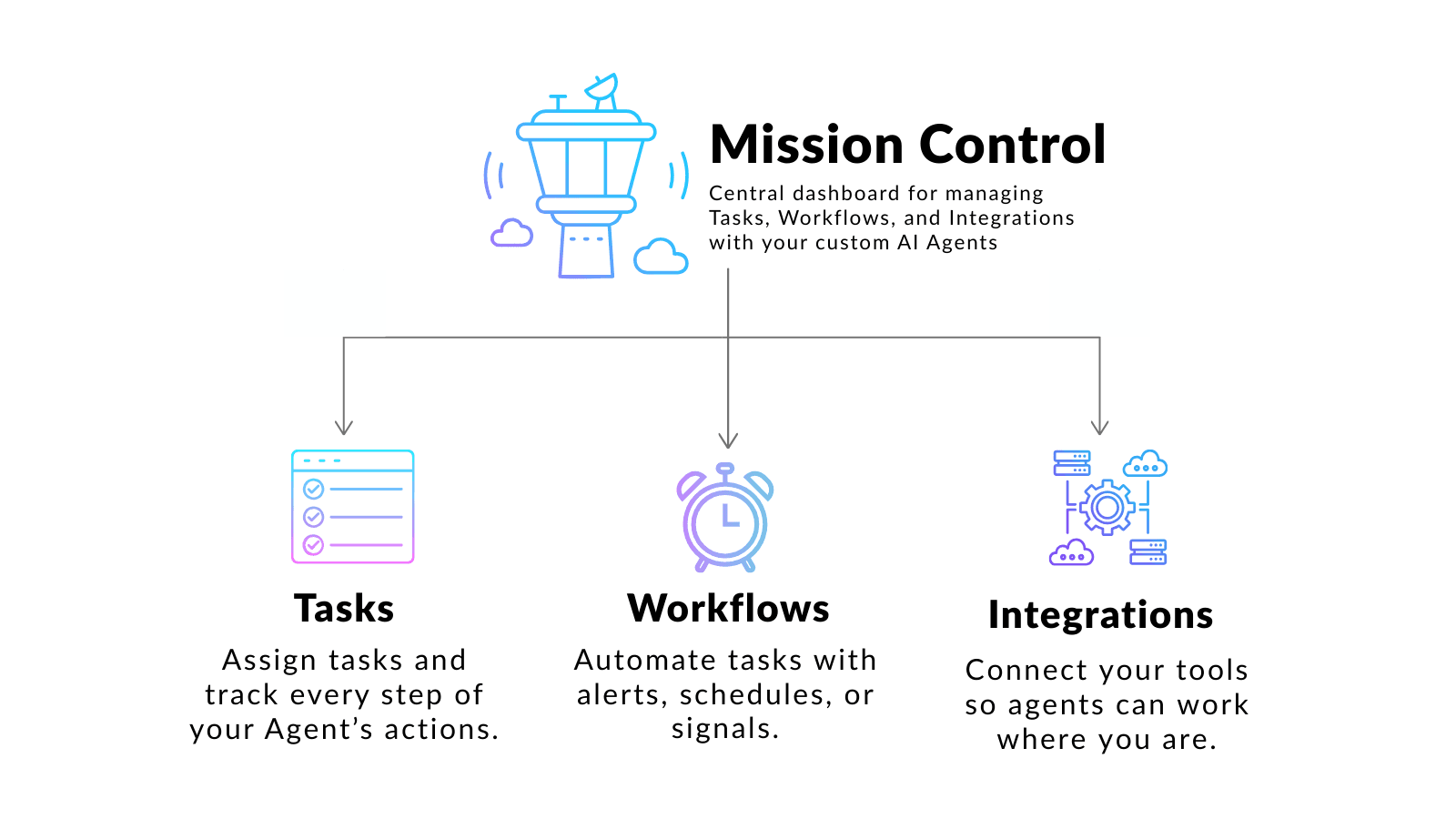
Everything runs with full context of your code. Continue doesn't just analyze or notify. It generates diffs, opens PRs, updates docs, creates tests, and produces the actual engineering artifacts you need. Mission Control connects your development tools to your codebase through Tasks, Integrations, and Workflows:
- A Task runs an Agent once—great for a one-off investigation or fix.
- A Workflow automates that Task based on triggers from GitHub, Sentry, Slack, cron schedules, or any other integration.
- An Integration lets Continue connect to the tools you already use, so Agents can read code, open pull requests, send messages, react to real-world events, and more.
Every run has full repo context. Agents can:
- Analyze issues
- Propose or apply fixes
- Generate diffs
- Open PRs
- Update documentation
- Create tests
- Comment back to tools like GitHub or Slack
Built for Dev Teams
The new Mission Control gives teams a foundation for scaling automation safely:
- You control the Prompts, Rules, Tools, and Models.
- You choose the triggers.
- You review and approve Workflows as needed.
The Inbox keeps track of every task and Session in one shared view so teams can track what’s running, what needs review, and where human oversight is needed.
Over time, Mission Control helps teams drive down intervention rates and identify Workflows that can safely run with less supervision.
This is what Continuous AI looks like in practice.
Start Today
Log into the new Mission Control at https://hub.continue.dev.
All your existing Agents and configurations are already migrated, or you can get started with a default agent.
If you’re new to Continue, start with something simple:
Pick a repetitive task and turn it into a Task or Workflow. See how quickly Continue starts saving you time.
The fastest way to ship code is to automate everything except the decisions that actually need you. Mission Control makes that possible.