Automate Your Developer Work in Two Clicks with Cloud Agents
Today, we're launching Tasks and Workflows in Continue Mission Control. If you've been using Continue in your IDE, you know how AI can help you write code faster. Now, we're taking that same power and extending it to all the repetitive work that happens around your code.
The value prop is simple: Turn any repeated developer task into automation with Cloud Agents in two clicks.
Draft changelog updates every week? Two clicks. Security reviews after every PR? Two clicks. Test coverage improvements daily? Two clicks.
You don't need to write scripts. You don't need to configure CI/CD pipelines. You don't need to remember to do the work. You just set it up once, and it happens automatically.
What You Can Do Today
We're launching with ready-to-use workflow templates that solve common problems with cloud agents:
Engineering Workflow Stack
Tasks and workflows that quietly keep your team moving.
Weekly
Draft Changelog Updates
Automatically generate changelog entries from your commits every week.
Docs
AGENTS.md Maintainer
Keep your agent documentation in sync with new PRs and config changes.
Daily
Improve Test Coverage
Surface small, targeted test improvements your team can make every day.
Frontend
Refactor React Components
Find complex React components and suggest incremental refactors weekly.
Security
Supabase Security Review
Connect your Supabase workspace to inspect schemas and run security checks.
Schema
Update Sanity Schema Docs
Keep your documentation aligned with Sanity schema changes automatically.
Analytics
Update PostHog Dashboards
Stop staring at charts—let agents spot patterns and flag dashboard updates.
PM
Update Jira Tickets
Connect Jira so issues stay updated automatically as work moves forward.
Perf
Optimize Website Performance
Run recurring Lighthouse audits and compare performance over time.
Turn repeated dev work into automation in two clicks.
Each template is pre-configured with the right cloud agent, tools, and triggers. You just connect it to your repository.
Cloud Agent Tasks v. Workflows
Feature
Continue Tasks
Continue Workflows
Scope
Single, atomic actions (e.g., “Write a test”)
Multi-step complex processes (e.g., “Triage, Fix, & PR”)
Trigger
Manual (Click or Command)
Automated (Event-based or Scheduled)
Best For
Removing friction from daily coding
Work that should happen automatically when a signal appears
Context
Local file or selection
Full repository and external tools
For a more detailed explanation of how to move from manual tasks to agentic workflows, check out our guide.
Setting Up a Cloud Agent Workflow
Here's how simple it is:
- Go to Mission Control and browse the workflow templates for each of the integrations or check out the suggestions in the Agents tab.
- Select the workflow you want your agent to complete
- Connect your repository and any necessary tools.
- Done
The workflow is live. It will run on schedule or trigger when the specified event happens. You'll see results in your inbox, review the changes, and merge when ready.
Just pick what you want automated and connect it to your code.
Need Something Custom? Build Your Own
The templates get you started fast, but you can also build workflows from scratch. When you create a custom workflow, you have full control:
Choose Your Trigger
- Cron - Run on a schedule (daily, weekly, hourly, or custom intervals)
- Webhook - Respond to events from GitHub, Sentry, Snyk, or any system that can send HTTP requests
Then configure the details
- Select an agent
- Pick a branch or repo
- Add secret headers
- Pass contextual payloads
- Define schedules or accept presets
No scripting. No infrastructure. Pure configuration.
Tasks: For the One-Off Work
Not everything needs automation. Sometimes you just want something done right now.
Tasks let you:
- Run a cloud agent with a prompt
- Target a repo or branch
- Get a summary, diff, and full logs
- Decide whether the output should become a workflow later
Use Tasks when you're testing an idea, handling a one-time request, or validating if something should become a workflow.
How It Works Under the Hood
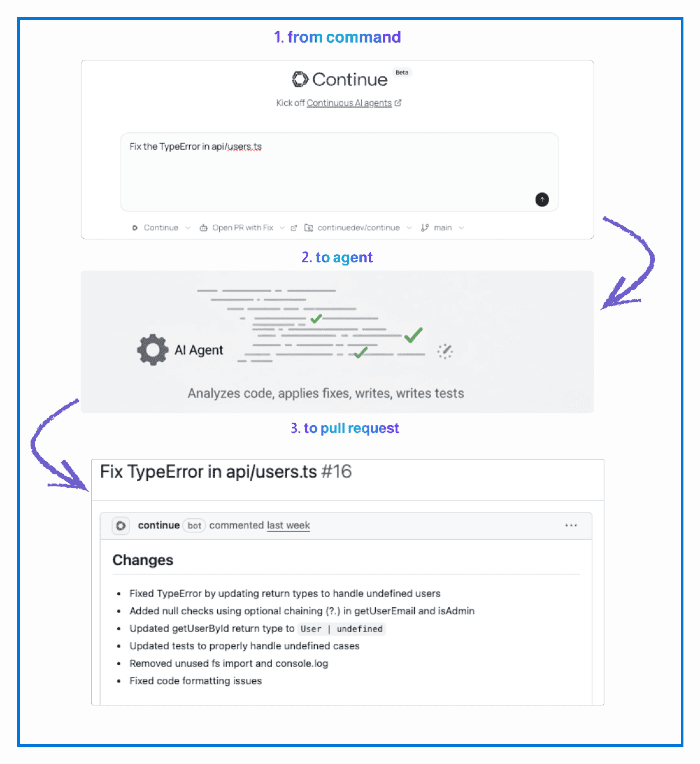
When a workflow triggers, here's what happens:
- The cloud agent analyzes your repository and branch
- It executes the task using the tools and rules you've configured
- It generates changes and creates a detailed session log
- Results show up in your Mission Control inbox
You see three things for every workflow run:
Summary - What the agent did and why it made specific decisions Diff - Files modified, lines changed, side-by-side comparison Logs - Complete record of tool calls, reasoning, and any errors
Everything is reviewable before it goes live. You're in control.
Why This Matters
If you're using Continue in your IDE, you already know how AI can help you write code faster. Tasks and Workflows extend that same capability to everything else.
We're removing the friction from developer work. The repetitive tasks that have to happen but don't require creativity or judgment. The maintenance work that keeps getting deprioritized.
AI amplifies intent. If your intention is to maintain higher standards, AI helps you maintain those standards consistently. Tasks and Workflows are tools that make that possible. If you want to learn more about Cloud Agents and how they work, check out our Developers Guide to Cloud Agents.
Get Started Today
Tasks and Workflows are live in Mission Control right now.
Browse the templates → pick one that solves something painful → connect your repo → and watch the work you’ve been putting off happen.
Spend more time building. Spend less time maintaining. Let Continue handle the work around your work.
The goal is simple: spend more time building and less time maintaining. Tasks and Workflows get you there.