
Turn Slack Conversations into GitHub PRs Automatically
There's a gap between where conversations happen and where work gets done. Your team discusses a bug in Slack. Someone says they'll look into it. Maybe they create an issue. Maybe it gets lost in the thread. Maybe it never makes it to GitHub at all.
The back-and-forth happens in Slack, but the actual work lives in GitHub. There's friction in that handoff, and friction means things slip through the cracks.
At Continue, we're making it easier to turn those slack conversations into action. If Tasks and Workflows automate the work inside your codebase, Slack and GitHub integrations automate the way teams communicate about that work, and how work gets created in the first place.
For the first time, Continue can take the conversations your team is already having and turn them directly into engineering actions with integrated cloud agents.
Cloud Agents that Understand Your Codebase
When you connect Slack to Continue, you're you're giving your AI agents access to the full context of your team's conversations. Your team already plans, discovers, debates, and diagnoses problems in Slack.
Now, Continue can step straight into that flow.
When you mention @Continue, the agent reads the thread, identifies the request, and does the work, creating GitHub issues, writing plans, fixing problems, and even opening PRs.
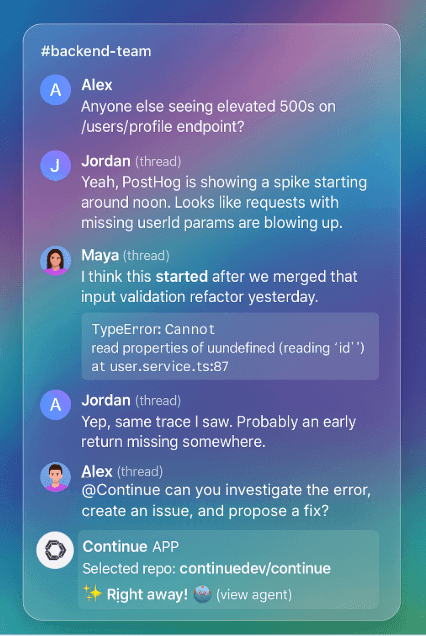
How Slack + Continue Streamlines Developer Workflows
-
Create issues directly from conversations: “@Continue this bug keeps happening — open an issue?” → Done.
-
Ask for a fix and get a PR back: "@Continue fix this bug and write a test to make sure it doesn't happen again." The agent explores the codebase, forms a plan, executes it, and posts updates back in the Slack thread.
-
Assign, discuss, and refine tasks without leaving Slack: "@Continue create a GitHub issue for this, linking to this thread, and assign Patrick." The agent keeps status synced across Slack and GitHub.
-
Use Linear or GitHub MCP tools Want a Linear ticket instead of a GitHub issue? Just say so.
It just takes a couple of clicks to set up.
Here's what that looks like in practice. Your team is discussing a performance issue in a thread. Someone mentions the specific endpoint that's slow. Someone else shares error logs. A third person suggests a potential fix.
Now, instead of manually translating all that context into an issue description and then trying to remember everything when you start coding, you can mention @Continue with your request right in that thread.
The agent has already read the entire conversation. It knows which endpoint you're talking about. It knows what the error logs show. It knows what solutions have been suggested. It uses all of that context to create a plan, open a PR, and actually implement the fix.
You can configure which repository Continue should use by default, or have it ask you every time, and you can use it both with Linear and GitHub. That means you can tell the agent to create a issue, assign it to someone, or have it work on the task for you.
If it gets stuck or needs more information, it tells you why and asks you to mention it again to continue.
GitHub Automation for Issues, PRs, and Repo Maintenance
Continue’s GitHub integration connects your repositories to a full automation layer for issues, PRs, reports, and workflows.
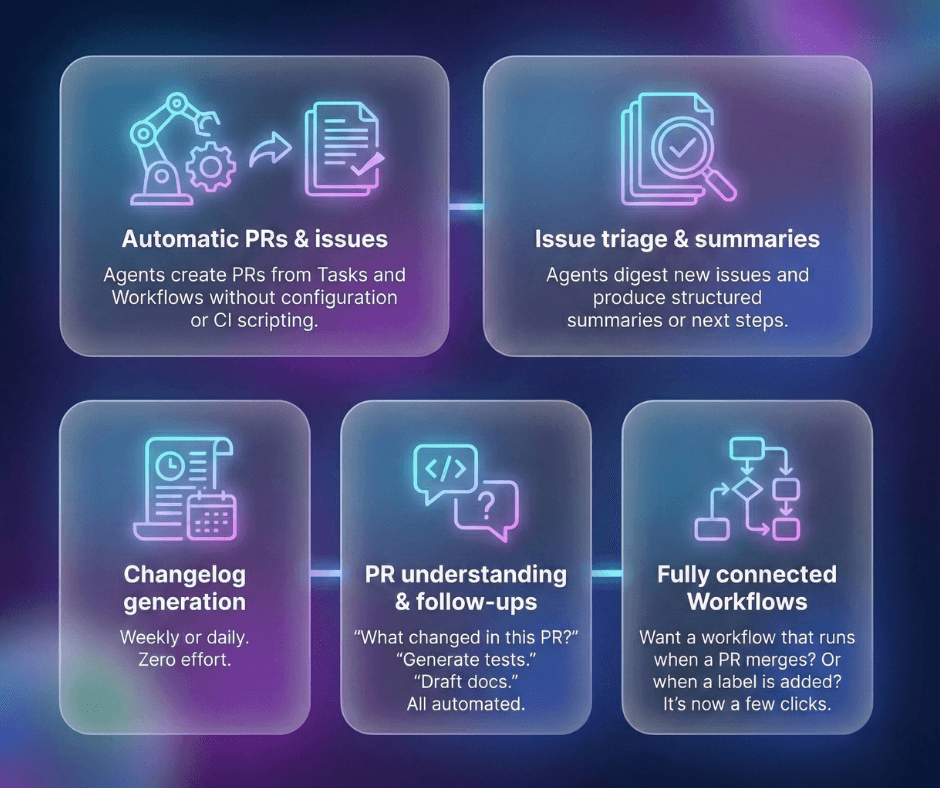
If Slack is where intent is expressed, GitHub is where that intent becomes code, and Continue sits exactly between the two.
Why AI Developer Automation Reduces Workflow Friction
These integrations prioritize context and that means the work happens where it should. Discussions stay in Slack. Code stays in GitHub. The agent bridges the gap without forcing you to change how your team already works, and you can track it's progress in your Mission Control inbox.
Developers lose enormous time switching between tools just to keep work moving.
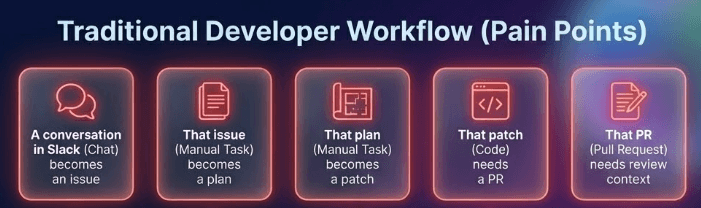
With Slack and GitHub connected, you still do all the thinking. Continue does everything around it.
- No more screenshotting stack traces into Slack
- No more “can someone open an issue for this?”
- No more “I’ll write up a plan later”
- No more forgetting to follow up
- No more tedious repo chores
You ask. Continue handles the execution.
How It Fits Into Continuous AI
Slack = where problems surface GitHub = where solutions land Continue = the cloud agent automation layer between them
Together, they unlock:
- Conversational PR generation
- Real-time automation of tedious engineering tasks
- Agents that understand your repo and your discussions
- A single, clean place to review all automated output: Mission Control
Getting Started
- Connect GitHub in Mission Control
- Add the Continue Slack app
- Mention @Continue in any thread
- Watch as conversation becomes action
Agents that listen, think, and act—directly inside the tools your team already uses every day.
👉 Try Slack + GitHub integrations now: https://hub.continue.dev 👉 Docs: https://docs.continue.dev/mission-control/integrations
FAQ: Cloud Agent Security
Can Cloud Agents read private Slack channels?
Continue Cloud Agents can only access channels where the app is explicitly invited. They do not scrape your entire workspace. The agent only processes messages in threads where it is tagged or in channels configured for specific automated triggers.